In 2026, launching a successful website, blog, or digital platform without high-quality, engaging visuals is virtually impossible. Search engine algorithms and user expectations have reached an all-time high. To stand out, relying on generic stock photos is no longer enough; your visual strategy must adapt to advanced search paradigms like Search Engine Optimization (SEO), Answer Engine Optimization (AEO), and Generative Engine Optimization (GEO).
If you are looking for copyright-free, stunning visuals without breaking the bank, this guide is tailored for you.
This is not just a theoretical list. This article is built directly on firsthand, practical experience. Every single tool featured below has been rigorously tested and utilized to design custom featured images, graphics, and thumbnails for my own website, TechTube. The results have been consistently professional, efficient, and highly relevant to user intent.
My Firsthand Experience with TechTube
When creating tech articles, custom thumbnails, and featured images for my website, relying on premium graphic design tools quickly became a costly and time-consuming venture. To optimize workflows, I deeply explored and integrated these 7 free AI image generators into our content pipeline.
By shifting to these platforms, TechTube’s visual content became instantly unique, which significantly dropped our bounce rate. Because these tools allow you to align visuals perfectly with user intent, they are indispensable assets for bloggers, developers, digital marketers, and content creators alike.
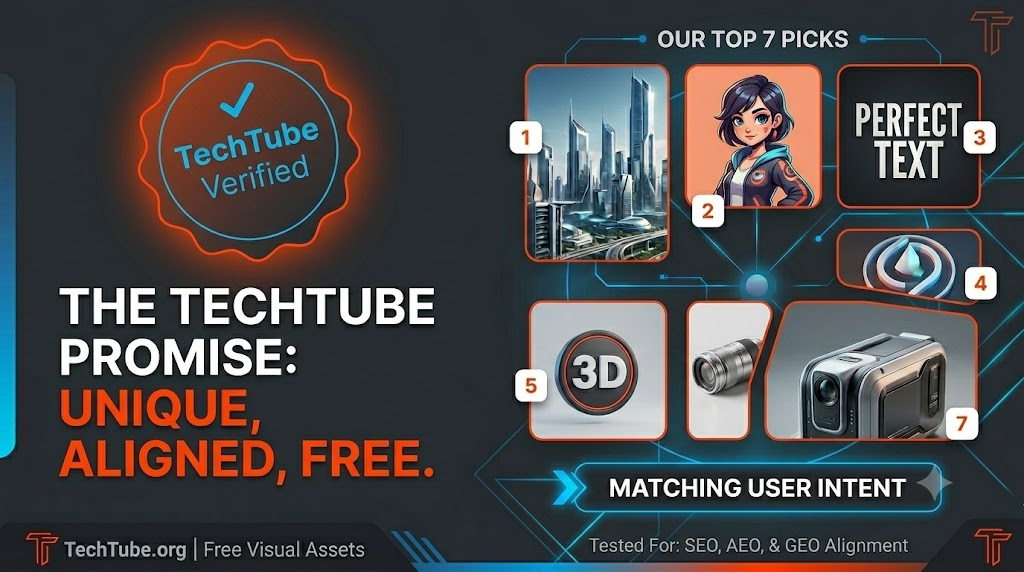
Detailed Review of the Top 7 Free AI Image Generator Tools
1. Microsoft Designer
Microsoft Designer stands as a premier option in the free AI ecosystem. Seamlessly integrated with Microsoft’s ecosystem, it offers a robust web-based interface powered by the latest iterations of DALL-E.
- The TechTube Experience: Whenever I needed clean, minimalistic tech gadgets, futuristic home offices, or modern workplace setups, Microsoft Designer delivered crisp, high-resolution outputs with remarkable consistency.
- Best For: Social media assets, blog headers, clean vector-style graphics, and modern UI mockups.
- Free Limit: 15 Daily Fast Boosts (Generation continues at a slower pace once boosts are exhausted).
2. Ideogram AI
Historically, rendering accurate text within an image was a major flaw for most generative AI models. Ideogram completely resolved this issue, setting a gold standard for text-in-image generation.
- The Tech Tube Experience: For Tech Tube banners requiring precise typography, such as “AI Revolution 2026” or “Top Tech Trends, “Ideogram was my go-to choice. It renders crisp, perfectly spelled text within complex artistic styles without any artifacting.
- Best For: Custom logos, T-shirt designs, cryptographic banners, and text-heavy promotional posters.
- Free Limit: Approximately 25 images per day on the free tier.
3. Google ImageFX
Google ImageFX is an intuitive, highly responsive tool powered by Google’s native Imagen models. Its interface introduces a unique user experience centered around fluid prompt modification.
- The TechTube Experience: ImageFX converts parts of your text prompt into interactive “chips” or tags. When brainstorming futuristic concept art for our website, I could simply click a chip to swap styles from “photorealistic” to “cyberpunk” instantly, speeding up my creative process.
- Best For: High-fidelity photorealism, conceptual art variations, and rapid brainstorming.
- Free Limit: Completely free to use with a standard Google Account.
4. Leonardo.ai
For creators who demand granular control over their generations, including aspect ratios, style weighting, negative prompts, and depth maps, Leonardo.ai offers an unmatched suite of advanced tools.
- The TechTube Experience: I utilized Leonardo.ai to craft visual assets for TechTube’s gaming and cyber-culture columns. Its specialized, fine-tuned models give graphics a distinct, polished digital art finish that rivals premium alternatives.
- Best For: Gaming assets, 3D assets, cinematic environments, and detailed character concepts.
- Free Limit: 150 daily tokens (allocating roughly 30 to 40 high-quality generations per day).
5. Adobe Firefly
As a trusted name in the creative industry, Adobe built Firefly with a strict focus on commercial safety. The model is trained exclusively on licensed content and public domain images.
- The TechTube Experience: Whenever I needed absolute assurance regarding copyright safety for monetization or commercial partnerships on our brand, Firefly was the ideal choice. The lighting, texture rendering, and depth of field feel incredibly organic.
- Best For: Commercial enterprise websites, professional blogs, and strict brand identity alignment.
- Free Limit: Monthly generative credits refreshed automatically via a free Adobe account.
6. Flux Schnell
The Flux architecture has disrupted the open-source generative AI landscape. The ‘Schnell’ (fast) variant provides incredible quality and speed without demanding high-end local hardware, thanks to open-source web hosting.
- The TechTube Experience: When our platform required hyper-realistic human portraits, realistic lifestyle tech imagery, or street photography aesthetics, Flux delivered lifelike skin textures and lightning-fast rendering speeds.
- Best For: Hyper-realism, rapid prototyping, and complex scene composition.
- Free Limit: Unlimited generation across various open-source dashboards like Hugging Face.
7. Canva Magic Media
Canva is a staple for online design, and its built-in Magic Media app embeds artificial intelligence generation directly into your existing canvas workflow.
- The TechTube Experience: This tool eliminated the multi-step process of generating, downloading, and re-uploading files. I could generate custom graphical elements directly inside Tech Tube’s thumbnail template, adjusting the layout on the fly.
- Best For: Agility, social media managers, and creators wanting an all-in-one generation and editing space.
- Free Limit: 50 free generations per month for standard accounts.
2026 SEO, AEO, & GEO Image Strategy
To ensure your content ranks across Google Search, conversational AI platforms (like Perplexity and ChatGPT), and generative layout feeds, your image optimization strategy must be intentional:
- Strict User Intent Clarity: Generative search engines cross-reference your image content with your textual data. If your article reviews the “Best Smartwatches,” your AI-generated image should showcase clear, unmistakable watch designs rather than abstract art.
- Contextual Alt Text (AEO Focus): Answer Engine Optimization relies heavily on how bots interpret your image. Write descriptive, natural-language Alt Text so AI assistants can accurately fetch and quote your image as a source.
- The Originality Premium (GEO Focus): Modern search layouts prioritize unique visual assets. By generating custom images rather than reusing over-saturated stock photography, platforms like TechTube establish immediate visual authority and lower bounce rates.
Frequently Asked Questions
Q1. Can AI-generated images be used on websites without facing copyright issues? Ans: Yes, images generated via tools like Adobe Firefly and Microsoft Designer are built to be commercially safe and can be used on platforms like our blog website without legal concerns.
Q2. Which free AI image generator handles text rendering most accurately? Ans: Ideogram AI is globally recognized as the most accurate and reliable free tool for embedding clear, stylized typography within images.
Q3. Does Google penalize websites for utilizing AI-generated imagery? Ans: No, Google does not penalize AI imagery as long as the visuals are high-quality, unique, and directly fulfill the user’s search intent.
Q4. Do any of these top 7 tools require a credit card to sign up? Ans: No, all seven platforms offer free tiers that can be accessed simply by registering with a standard Gmail or Microsoft account.
Final Words
Choosing the right AI image generator comes down to your specific project needs. If you need pixel-perfect text, Ideogram is your best bet. For absolute commercial safety, Adobe Firefly shines, while Microsoft Designer and Google ImageFX offer incredible versatility for everyday blogging.
By integrating these 7 free AI image tools into my workflow for TechTube, I managed to scale our visual content seamlessly while keeping costs at zero. In this new era of SEO, AEO, and GEO, unique visuals are no longer optional—they are a ranking necessity. Pick the tool that aligns with your creative style, focus on matching your user’s intent, and watch your platform’s engagement soar.